
SEO · Content Strategy · Topic Clusters · explore our digital marketing FAQs
A pillar page is a comprehensive, long-form resource that covers a broad topic in depth and serves as the central hub of a topic cluster. It links to and from multiple related blog posts (cluster pages), signalling topical expertise to search engines and AI answer engines. Topic clusters built around pillar pages drive 30–43% more organic traffic than unconnected content, according to HubSpot research. In 2026, pillar pages are also critical for AI search visibility — clustered content receives 3.2× more AI citations than standalone posts. explore our digital marketing FAQs
If you've spent any time reading about SEO strategy, you've probably encountered the term "pillar page." The concept was formalised by HubSpot back in 2016–2017, and it's remained one of the most effective content architecture strategies available to B2B marketers.
But pillar pages in 2026 look different from pillar pages in 2018. Google now officially uses "topic authority" as a ranking factor. AI search engines like ChatGPT, Perplexity, and Google AI Overviews are reshaping how content gets discovered. And Google's December 2025 core update reinforced depth over breadth, with sites using mass-produced AI content seeing 85–95% traffic losses.
In this guide, we'll explore what pillar pages are, why they're more important than ever, the three types of pillar pages, and the step-by-step process for building one that ranks.
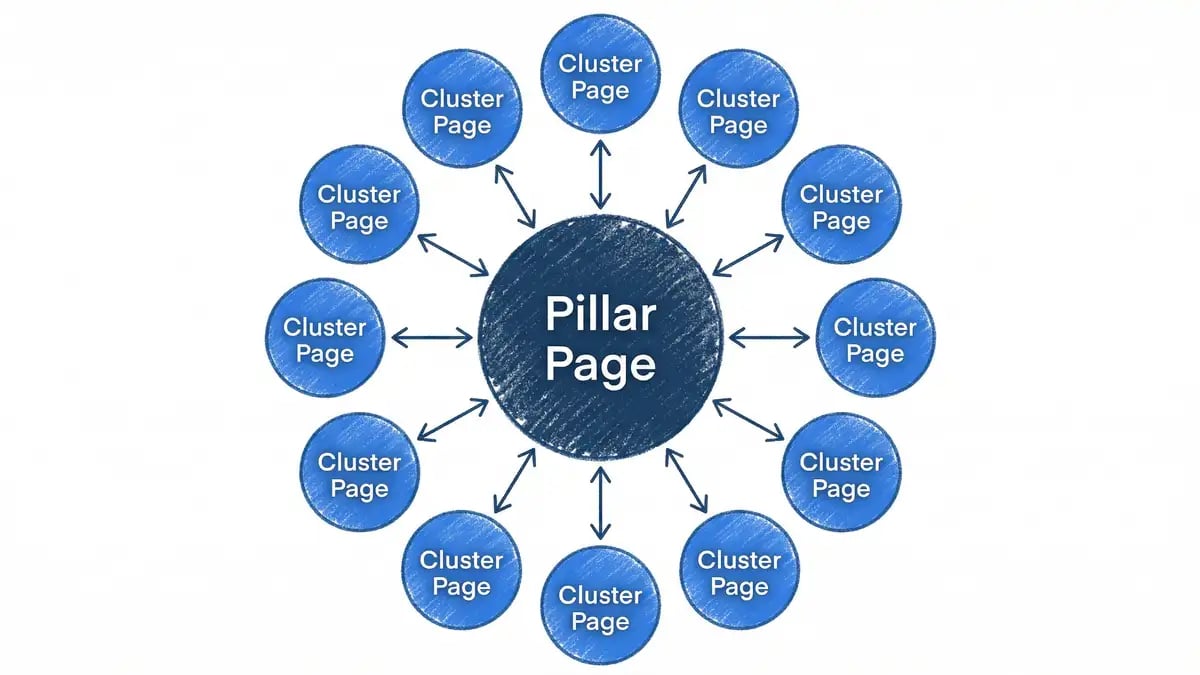
What Is a Pillar Page?
A pillar page is a comprehensive, long-form resource that covers a broad topic in depth. It serves as the central hub of a "topic cluster" — a content architecture strategy where one pillar page links to and from multiple cluster pages, all exploring specific sub-topics related to the main pillar topic.
For example, a pillar page on "content marketing" might link to cluster pages on "how to write a blog post," "content calendar templates," "content repurposing," and "SEO copywriting."
The pillar page concept was formalised by HubSpot back in 2016–2017 as a way to help marketers build topical authority and improve SEO performance. Since then, it's become one of the most effective content architecture strategies available to B2B marketers and publishers.
In 2026, pillar pages have taken on added importance. Here's why:
- Google officially uses topic authority as a ranking factor. Since May 2023, Google has been using "topic authority" as an official ranking factor. This means creating a pillar page with supporting cluster pages signals to Google that you're an authoritative source on a topic.
- AI search engines reward topic clusters. ChatGPT, Perplexity, and Google AI Overviews are reshaping how content gets discovered. These AI models favour websites with demonstrated topical expertise — pillar pages with topic clusters receive 3.2× more AI citations than standalone posts.
- Depth beats breadth in rankings. Google's December 2025 core update reinforced that deep, substantive content outperforms thin, breadth-focused content. Sites using mass-produced AI content or thin content saw traffic drops of 85–95%. Pillar pages with supported cluster pages demonstrate the kind of depth Google now prioritises.
Key stat: Topic clusters built around pillar pages drive 30–43% more organic traffic than unconnected content, according to HubSpot's research.
The 3 Types of Pillar Pages (2026)
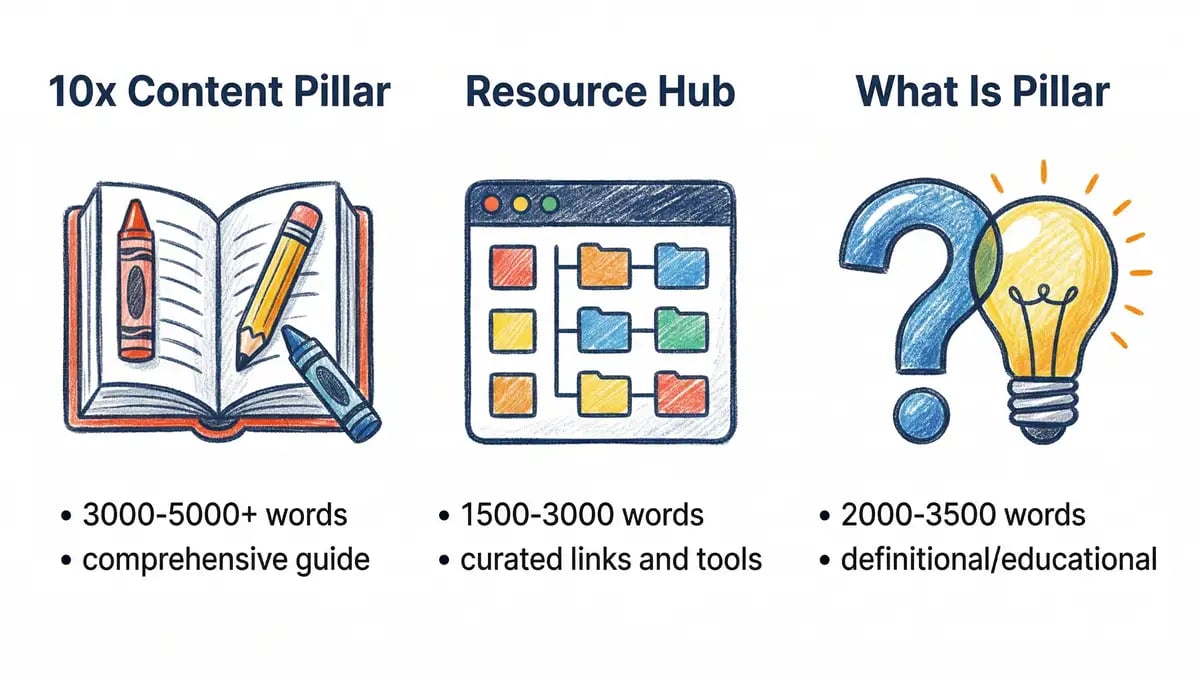
Not all pillar pages are the same. In 2026, there are three distinct types of pillar pages, each suited to different topics and audiences.
1. The 10x Content Pillar (Ultimate Guide)
The 10x Content Pillar, also known as an "ultimate guide," is the most comprehensive type of pillar page. It's an in-depth guide that covers a broad topic from start to finish, addressing every question, concern, and sub-topic a reader might have.
Example: "The Complete Guide to SEO in 2026" or "How to Build a Content Marketing Strategy From Scratch"
Characteristics:
- 3,000–5,000+ words
- Covers multiple sub-topics comprehensively
- Includes original research, data, or insights
- Extensive internal linking to supporting cluster pages
- Designed to rank for a broad, high-volume keyword
When to use: Use this type when you want to dominate a broad, competitive keyword and establish authority across a wide topical area.
2. The Resource Hub Pillar
A Resource Hub Pillar is a curated collection of links, tools, templates, and resources, all organised by category. Rather than long-form narrative content, it's structured as a directory or reference guide.
Example: "The Ultimate Content Marketing Resource Hub" or "SEO Tools & Templates Directory"
Characteristics:
- Heavily organised by category or section
- Includes curated links, tools, templates, checklists
- Lower word count than 10x Content Pillar (often 1,500–3,000 words)
- High link equity distributed to cluster pages and external resources
- Updated regularly to keep resources fresh
When to use: Use this type when your audience values practical tools and resources over narrative explanation, or when your topic is very broad and sub-topics don't warrant deep exploration.
3. The "What Is" Pillar (Definitional)
A "What Is" Pillar is an educational page that defines a concept and explains its key components, benefits, and applications. It's shorter and more focused than a 10x Content Pillar, but still comprehensive.
Example: "What Is Programmatic Advertising?" or "What Is a CRM?"
Characteristics:
- 2,000–3,500 words
- Defines the core concept clearly
- Explains key components, types, and use cases
- Addresses common questions and misconceptions
- Links to more detailed cluster pages for deeper exploration
When to use: Use this type when your topic is a concept or term that audiences search for to learn "what it is," and you want to position yourself as the go-to educational resource.
Why Pillar Pages Matter Now More Than Ever
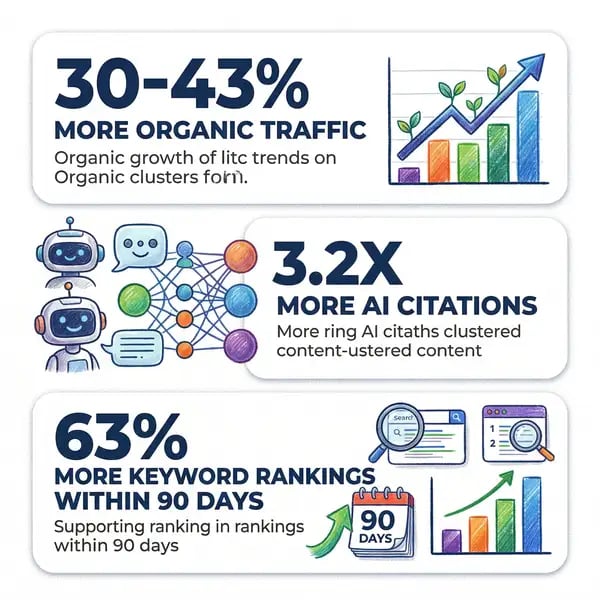
If you were on the fence about pillar pages, here's why you should prioritise them in 2026:
1. Google Officially Recognises Topic Authority
For years, SEO professionals speculated that topic authority mattered. As of May 2023, it's confirmed: Google officially confirmed that topic authority is a ranking factor.
A pillar page with supporting cluster pages sends a clear signal to Google that you've thoroughly explored a topic. This topical authority translates to better rankings across your content cluster.
2. AI Search Demands Topical Expertise
ChatGPT, Perplexity, Google AI Overviews, and other AI search systems are reshaping how content gets discovered. Unlike traditional search, which looks at individual pages, AI search systems evaluate entire domains and content clusters.
When an AI system is generating an answer, it looks for sources with demonstrated expertise across a topic. A website with a pillar page and 10+ cluster pages signals broader expertise than a competitor with only standalone articles.
Here's the data:
- Topic clusters receive 3.2× more AI citations than standalone posts (per HubSpot's analysis of Perplexity and ChatGPT outputs)
- Pages linking within a topic cluster receive 63% more keyword rankings within 90 days
- Topic clusters drive 30–43% more organic traffic than unconnected content
3. Google's December 2025 Core Update Reinforced Depth
Google's December 2025 core update was brutal for thin, mass-produced content. Sites relying on AI-generated content or shallow coverage saw traffic drops of 85–95%.
Meanwhile, sites with deep, topical authority — like pillar pages with well-developed cluster pages — saw stability or growth.
The message is clear: depth beats breadth. A shorter pillar page with original research or insights will outrank a longer pillar page filled with generic AI-written content.
Want to see how pillar pages fit your content strategy?
Our team builds topic clusters that drive 30–43% more organic traffic — and we can show you the gaps in yours.
Explore Our SEO Services →How to Build a Pillar Page: Step-by-Step
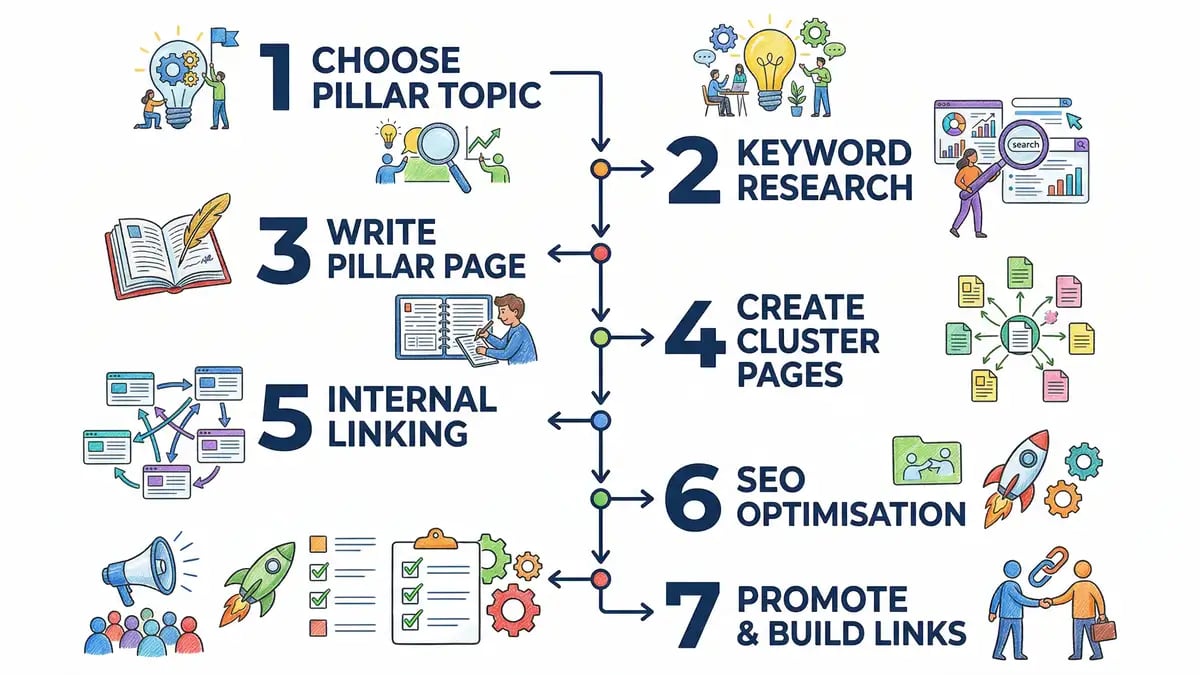
Now that you understand what pillar pages are and why they matter, let's walk through the step-by-step process for building one.
Step 1: Choose Your Pillar Topic
The foundation of a successful pillar page is choosing the right topic. Here's what to look for:
A. Broad enough to sustain 8–15 cluster pages
Your pillar topic should be broad enough that you can support it with 8–15 cluster pages exploring different angles. If you can only create 3–4 cluster pages, your topic is too narrow — it shouldn't be a pillar.
Example: "Content marketing" is broad enough (you can write about blog posts, social media, email, webinars, video, etc.). "How to format a blog post headline" is too narrow.
B. Demand in your audience
Use keyword research to ensure your chosen topic has actual search demand. Look for:
- A broad primary keyword with significant search volume (500+ searches/month)
- Multiple sub-keywords and cluster opportunities (check Google Keyword Planner, Ahrefs, SEMrush, or similar tools)
- Content gaps — are competitors ranking with thin content that you can outrank with deeper content?
C. Relevance to your business
Your pillar topic should align with your business goals. Don't create a pillar page just because the topic is popular — make sure it relates to your products, services, or expertise.
Step 2: Conduct Comprehensive Keyword Research
Before you write a single word, map out your keyword landscape for the topic.
A. Identify the primary pillar keyword
This is the broad, high-volume keyword you want your pillar page to rank for. Examples:
- "Content marketing"
- "SEO strategy"
- "Email marketing"
- "Project management"
B. Identify 8–15 sub-topic keywords for cluster pages
Use keyword research tools to find related keywords that you can turn into cluster pages. These should be more specific than your primary keyword but still related to your pillar topic.
Examples for the "content marketing" pillar:
- "How to write a blog post"
- "Content calendar templates"
- "Content marketing strategy"
- "SEO copywriting tips"
- "Content repurposing ideas"
- "Content marketing tools"
- "Brand storytelling"
- "Evergreen content"
- "Video marketing strategy"
- "Podcast marketing"
C. Analyse your competition
Check what's currently ranking for your pillar keyword. Are competitors using pillar pages? If so, what does their cluster strategy look like? If not, this is an opportunity to dominate by being the first to create a pillar page on the topic.
Step 3: Write Your Pillar Page
Now it's time to write. Here are the key principles for writing a pillar page that ranks:
A. Aim for 3,000–4,000 words (minimum 2,500)
Content exceeding 3,000 words generates 3× more traffic and attracts 3.5× more backlinks, according to Semrush's research. However, length without substance doesn't work — a shorter pillar with original data will outrank a padded longer one.
B. Cover all major sub-topics without going too deep
Your pillar page should cover all the major sub-topics related to your pillar keyword, but not dive too deep into any single one. That's what your cluster pages are for.
For example, a "Content Marketing" pillar page might have sections on:
- What is content marketing
- Why content marketing matters
- Types of content marketing (blog posts, video, email, social media, etc.)
- How to create a content marketing strategy
- Content marketing tools and resources
- Measuring content marketing success
But it shouldn't have a 2,000-word section on "How to write a blog post" — that deserves its own cluster page.
C. Include original research, data, or insights
Generic pillar pages don't rank. Include:
- Original research (survey data, case studies, internal metrics)
- Unique frameworks or methodologies
- Expert opinions (interviews with industry leaders)
- Proprietary data or insights
This is especially important post-December 2025 core update. Sites with original data and insights ranked well; sites with generic AI content tanked.
D. Write for both humans and search engines
Use your primary keyword naturally throughout the content, but don't force it. Optimise for:
- Keyword usage (include your primary keyword and related keywords naturally)
- Readability (use short paragraphs, bullet points, subheadings)
- User intent (answer the questions users are searching for)
E. Create an easy-to-scan structure
Use clear headings (H2, H3), bullet points, and short paragraphs. Users should be able to scan the page and find what they're looking for in seconds.
Step 4: Create Your Cluster Pages
With your pillar page drafted, create 8–15 cluster pages exploring the sub-topics you identified in your keyword research.
A. Each cluster page should:
- Target a specific long-tail or mid-tail keyword (e.g., "how to write a blog post," "content calendar templates")
- Go deeper into a single sub-topic than your pillar page does
- Link back to your pillar page (and to other related cluster pages)
- Be high-quality, original content (1,500–2,500 words)
B. Internal linking strategy:
- Link from the pillar page to all cluster pages
- Link from each cluster page back to the pillar page
- Link between related cluster pages (e.g., "How to Write a Blog Post" links to "SEO Copywriting Tips")
C. Timing:
You don't need all 8–15 cluster pages live before you publish your pillar page. However, you should launch at least 3–5 cluster pages shortly after publishing the pillar page (within 2–4 weeks). This sends a strong topical authority signal to Google.
Step 5: Set Up Your Internal Linking Strategy
Now that you have your pillar page and cluster pages, it's time to link them together strategically.
A. Pillar-to-cluster linking
Within your pillar page, link to relevant cluster pages using descriptive anchor text. Example:
"To learn more about SEO copywriting best practices, check out our in-depth guide on SEO copywriting tips."
B. Cluster-to-pillar linking
In each cluster page, link back to the pillar page once or twice. Use anchor text that includes your primary pillar keyword.
Example: "For more on content strategy, see our complete guide to content marketing."
C. Cluster-to-cluster linking
Link between related cluster pages. If you have a cluster page on "How to Write a Blog Post" and another on "SEO Copywriting Tips," these naturally relate to each other and should link to each other.
D. Use descriptive anchor text
Avoid generic anchor text like "click here." Instead, use descriptive anchor text that includes the target keyword (e.g., "learn more about content marketing strategy" rather than "learn more").
Step 6: Optimise for SEO
Before publishing, optimise your pillar page for search engines:
A. Meta description
Write a compelling meta description (155–160 characters) that includes your primary keyword and summarises the page content.
B. Title tag
Include your primary keyword near the beginning of your title tag (50–60 characters). Make it compelling and descriptive.
C. Header tags
Ensure you have a single H1 tag that matches or closely matches your title tag. Use H2s and H3s to structure your content hierarchically.
D. Image optimisation
Include relevant images and optimise their alt text. Use your pillar keyword in at least one image alt text, but only if it makes sense.
E. Page speed
Ensure your pillar page loads quickly. Compress images, minimise JavaScript, and leverage caching where possible.
F. Schema markup
Add appropriate schema markup (Article, BreadcrumbList, FAQPage, etc.) to help search engines understand your content better.
Step 7: Promote and Build Backlinks
Publishing your pillar page is just the beginning. Promotion drives visibility and backlinks, which further boost rankings.
A. Internal promotion
- Link to your pillar page from your homepage, navigation menu, or footer
- Mention it in your email newsletter
- Share it across your social media channels
B. External promotion
- Reach out to relevant stakeholders: Email industry influencers, experts, and websites mentioned or linked to in your pillar page. Let them know you've created a comprehensive resource and ask if they'd like to share it or link to it.
- Guest posting: Write guest posts on related websites and link back to your pillar page.
- Digital PR: Pitch your pillar page to journalists and bloggers as a newsworthy resource, especially if it includes original research or data.
- Skyscraper technique: Find websites linking to competing pillar pages and reach out with a better version of your pillar page.
C. Backlink building
Backlinks remain one of the strongest ranking factors. Prioritise earning backlinks to your pillar page. Some ideas:
- Include original research or data that others will cite and link to
- Create an infographic summarising your pillar page and encourage sharing
- Reach out to industry publications about your pillar page or research
Pillar Page Examples (2026)
To help you visualise what a successful pillar page looks like, here are three examples:
1. HubSpot's "Content Marketing" Pillar
HubSpot's ultimate guide to content marketing is a classic example of a 10x Content Pillar. It's comprehensive, original, and thoroughly linked to HubSpot's cluster of content marketing articles. It ranks for the highly competitive term "content marketing" and drives significant traffic.
2. Moz's "SEO" Pillar
Moz's "Beginner's Guide to SEO" is an excellent example of a "What Is" Pillar that educates readers on SEO fundamentals while positioning Moz as an authoritative source. The guide links to Moz's extensive whitepages and resource library (cluster content).
3. Neil Patel's "Digital Marketing" Pillar
Neil Patel's comprehensive guide to digital marketing is a 10x Content Pillar covering everything from SEO to paid advertising. It's extensively linked to Neil Patel's individual guides on specific digital marketing channels (cluster pages).
Ready to Build Your Pillar Page Strategy?
We've helped B2B companies build topic clusters that drive 30–43% more organic traffic and 3.2× more AI citations. Book a free consultation to see where your content gaps are.
Book a Free Consultation Get a Free SEO Audit →Pillar Page FAQ
Here are answers to the most common questions about pillar pages:
Q: How long does it take for a pillar page to start ranking?
A: Most pillar pages begin showing improvements in rankings within 2–3 months of publication, especially if you're launching cluster pages alongside the pillar. However, competitive keywords may take 6–12 months to see significant ranking improvements. Consistency and ongoing optimisation matter.
Q: How many cluster pages do I need before publishing my pillar page?
A: You don't need all 8–15 cluster pages live before publishing your pillar page. However, launching at least 3–5 cluster pages within 2–4 weeks of the pillar page publication is ideal for signalling topical authority to Google.
Q: Should my pillar page target a specific keyword or multiple keywords?
A: Your pillar page should target a primary keyword (e.g., "content marketing"), but it should naturally include variations and related keywords (e.g., "content marketing strategy," "B2B content marketing"). Don't force keyword variations — write for humans first, search engines second.
Q: Can I turn existing blog posts into a pillar page structure?
A: Yes! If you already have a collection of blog posts on a topic, you can retroactively create a pillar page that ties them together. Write a comprehensive pillar page that covers all your existing blog posts and links to them. This is called "retrofitting" and is a great way to leverage existing content.
Q: Are pillar pages better than topic maps or silos?
A: Pillar pages and topic clusters are the modern evolution of topic silos. While traditional topic silos used directory structures (e.g., /content-marketing/blog-posts/), pillar pages use internal linking to connect related content. Both can work, but pillar pages offer more flexibility and are easier to implement.
Q: How often should I update my pillar page?
A: Update your pillar page every 6–12 months to keep it fresh and accurate. Include the latest data, research, and trends. Regular updates signal to Google that your content is current and authoritative.
Q: What if my topic is too broad or too narrow for a single pillar page?
A: If your topic is too broad, split it into multiple pillars. For example, instead of one "Digital Marketing" pillar, create separate pillars for "Content Marketing," "SEO," and "Paid Advertising." If your topic is too narrow, consider making it a cluster page instead of a pillar, or broaden your pillar topic.
Q: Do pillar pages work for E-E-A-T and topical authority?
A: Absolutely. Pillar pages are one of the best ways to demonstrate E-E-A-T (Experience, Expertise, Authoritativeness, Trustworthiness) and topical authority. A pillar page with supporting cluster pages signals deep expertise on a topic, which is exactly what Google's E-E-A-T guidelines emphasise.
The Bottom Line
Pillar pages are more important than ever in 2026. They help you demonstrate topical authority to both Google and AI search engines, improve your rankings across a topic cluster, and drive 30–43% more organic traffic than unconnected content.
Whether you're building a new pillar page from scratch or retrofitting an existing collection of blog posts into a pillar structure, the process is straightforward:
- Choose a broad pillar topic
- Conduct keyword research on your topic and its sub-topics
- Write a comprehensive 3,000–4,000 word pillar page
- Create 8–15 cluster pages exploring sub-topics in depth
- Strategically link your pillar page to all cluster pages and vice versa
- Optimise for SEO (meta tags, schema, page speed, etc.)
- Promote and earn backlinks to boost visibility
Follow these steps, and you'll be well on your way to building a pillar page that drives traffic, establishes authority, and ranks for competitive keywords.
Ready to build your first pillar page? Get in touch with our SEO team to discuss your content strategy.
Continue Reading
- Topic Clusters for SEO: How to Build Authority Around Keywords
The linking strategy that makes pillar pages work. - How to Write Evergreen Content: A Complete Guide
Content that ranks for years, not months. - SEO Copywriting: How to Write Copy That Ranks and Converts
Learn to rank while selling. - How to Build a Content Strategy From Scratch [2026 Framework]
A proven framework for building a content strategy that works. - Keyword Research for SEO: The Complete Guide
Find keywords your audience is actually searching for. - Internal Links for SEO: The Ultimate Guide
The linking strategy that makes topic clusters work.